If you want to understand a check-engine light before paying for a diagnostic visit, this VDIAGTOOL VD10 review looks at a straightforward OBD2 scanner for DIY owners.
The VDIAGTOOL VD10 OBD2 Scanner focuses on core engine diagnostics, including code reading, live data, freeze-frame information, and I/M readiness.
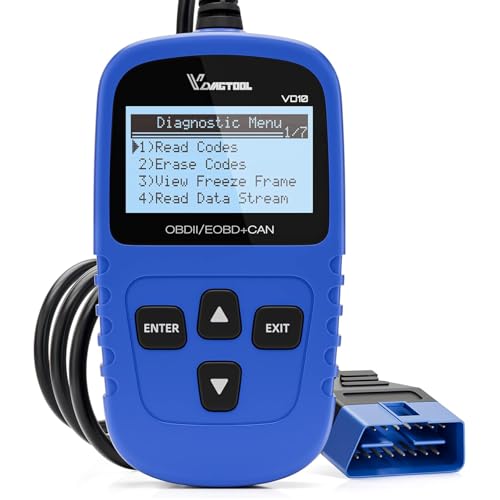
Table of Contents
VDIAGTOOL VD10 Review Summary
The VDIAGTOOL VD10 is designed for car owners and hobbyists who want quick access to useful OBDII information without batteries, a charger, or a complicated setup.
According to the listing, you plug it into the vehicle’s OBDII port, let it scan, and read fault-code information on its built-in display.
That makes it a sensible fit for someone who wants to decide whether a warning light needs immediate attention, whether a repair addressed the underlying issue, or whether a vehicle is ready for an emissions inspection.
Its strongest value is breadth within the basic OBDII category.
It can read and clear diagnostic trouble codes, show code definitions from a built-in database of more than 3,000 codes, display live sensor data, retrieve freeze-frame details, and check readiness monitors.
It is a practical diagnostic aid, not a replacement for professional diagnosis or a full vehicle-specific service scanner.
Review Scorecard
| Category | Score | Buyer assessment |
|---|---|---|
| Ease of setup | 9/10 | Plug-and-play connection and no battery or charger required. |
| Code-reading usefulness | 8/10 | Reads generic, pending, and listed manufacturer-specific code types. |
| On-screen guidance | 8/10 | Built-in definitions reduce the need to search every code online. |
| Diagnostic depth | 7/10 | Live data and freeze-frame add context beyond a basic code reader. |
| Inspection preparation | 8/10 | I/M readiness checks whether required monitors have completed. |
| Vehicle coverage | 8/10 | Supports major OBDII protocols and a broad range of post-1996 vehicles. |
| Portability | 8/10 | A wired handheld design is ready whenever the vehicle is accessible. |
For buyers asking “is VDIAGTOOL VD10 worth it,” the answer depends on expectations.
It is worth considering when the priority is accessible OBDII engine information; it is less suitable when you need advanced manufacturer modules, coding, bidirectional controls, or a wireless phone-based experience.
Key Features and Specifications of VDIAGTOOL VD10
The VD10’s feature set is centered on common check-engine-light tasks.
It supports the following functions:
- Read and clear codes: The scanner retrieves diagnostic trouble codes and can erase them after the underlying fault has been fixed. Clearing a code is not the same as repairing the problem, so the warning may return if the cause remains.
- Built-in DTC lookup: The listing says the device includes definitions for more than 3,000 codes. It covers generic P0, P2, P3, and U0 codes, as well as listed manufacturer-specific P1, P3, and U1 codes.
- Live data: The tool can display information from vehicle sensors, including engine RPM, intake air temperature, short- and long-term fuel data, and misfire data. These readings can help narrow down what was happening when a fault appeared.
- Freeze-frame retrieval: Freeze frame shows data stored by the powertrain control module alongside a diagnostic trouble code. That is particularly useful for intermittent issues because it preserves a snapshot associated with the fault.
- I/M readiness: The readiness function checks emissions-system monitors after a reset. This is useful before an inspection, since recently cleared codes can leave monitors incomplete even when the warning light is off.
- Vehicle information: The scanner can retrieve the VIN, calibration IDs, and calibration verification numbers. The listing notes that this can help when checking whether an ECU matches a used vehicle.
- Protocol support: The VD10 supports CAN, ISO9141, KWP2000, J1850 PWM, and J1850 VPW protocols. The listing describes compatibility with 12V OBDII-compliant cars, SUVs, and light trucks, including post-1996 US vehicles, post-2006 EU vehicles, and post-2009 Asian vehicles.
- Handheld display: A two-line LCD screen uses white backlighting and offers contrast adjustment. The wired format draws power from the vehicle, so there is no separate battery to maintain.
Compatibility still deserves a careful check. “OBDII-compliant” does not mean every diagnostic function works on every vehicle, and this evidence does not establish coverage for non-OBDII cars, heavy-duty trucks, motorcycles, or advanced modules.
Buyers should confirm their vehicle’s market, model year, engine, and diagnostic-port requirements before ordering.
Pros and Cons of VDIAGTOOL VD10
Pros
- Simple setup: Plugging into the OBDII port and powering from the car keeps the process uncomplicated.
- Useful core coverage: Code reading, clearing, live data, freeze frame, vehicle information, and readiness testing make it more capable than a code-only reader.
- On-device definitions: The built-in code database can make initial troubleshooting faster and more convenient.
- Good DIY orientation: The listing specifically positions the VD10 for car owners and hobbyists, including users with limited mechanical experience.
- Broad protocol support: CAN, ISO9141, KWP2000, J1850 PWM, and J1850 VPW cover the protocols identified in the product evidence.
Cons
- Basic OBDII scope: The evidence does not indicate support for ABS, airbag, transmission, body-control, coding, or bidirectional functions.
- No wireless workflow: This is a physical handheld scanner rather than a Bluetooth tool that stores data in a phone app.
- Small display: The two-line screen is convenient for simple readings but may be less comfortable for navigating large amounts of live data.
- Code clearing requires judgment: Erasing the MIL before fixing the cause can hide useful information and will not make an unresolved fault disappear permanently.
- Compatibility is not universal: The stated coverage applies to OBDII-compliant 12V vehicles and does not guarantee every feature on every model.
Who Should Buy VDIAGTOOL VD10?
The best buyer is a DIY vehicle owner who wants an always-available first look at a check-engine warning.
It can help a commuter distinguish between a code worth researching immediately and one that may be monitored, while giving a hobbyist more context than a simple warning-light reset.
Used-car shoppers may also appreciate the ability to retrieve VIN-related information and review diagnostic status, although a scanner should be only one part of a pre-purchase inspection.
It is also a good match for owners preparing for emissions testing.
The I/M readiness check can reveal whether monitors have completed after maintenance or a code reset, helping avoid an unnecessary inspection trip.
The wired, vehicle-powered design suits a glovebox tool kit because it is ready without charging.
Skip the VD10 if you expect dealer-level coverage or need to diagnose systems outside the engine/emissions side of standard OBDII.
Professional technicians, advanced enthusiasts, and owners troubleshooting airbag, ABS, transmission, or body electronics should look for a scan platform that explicitly supports those systems.
Likewise, choose another format if phone synchronization, reports, or wireless convenience matters more than a self-contained handheld reader.
How the VDIAGTOOL VD10 Helps Narrow Down Engine Faults
Start with the code definition
The built-in database can display a definition for many common codes, so the first step does not require an immediate online search.
Treat that definition as a direction for diagnosis rather than a guaranteed failed part: one code can have several possible causes.
Add freeze-frame context
Freeze-frame data can show the operating conditions recorded when the fault was logged.
Looking at that snapshot alongside the code may help identify whether the issue appeared during a particular engine speed, temperature, or load condition.
Compare live sensor readings
The VD10 can show engine RPM, intake air temperature, fuel-trim data, and misfire data.
Those readings give a DIY owner more context than a static code, especially when a warning is intermittent.
The tool provides information; interpreting unusual values still requires vehicle-specific knowledge.
Verify readiness after repairs
After a repair, the I/M readiness screen can confirm whether the relevant monitors have run.
This is more useful than assuming the car is inspection-ready simply because the malfunction light has been cleared.
Alternatives to VDIAGTOOL VD10
The right alternative depends on whether you want similar handheld basics, a wireless app, or deeper system coverage.
- ANCEL AD410 OBD2 Scanner is a credible handheld alternative for buyers comparing compact code readers with live data and readiness-oriented functions.
- Autel AutoLink AL319 is worth considering if you prefer a well-known entry-level OBDII product line for basic code reading and clearing.
- BlueDriver Bluetooth Pro OBD2 Scanner fits buyers who want a phone-based wireless workflow and app-guided reporting instead of a built-in two-line display.
- FOXWELL NT301 OBD2 Scanner is another handheld option to compare when live data and inspection-readiness checks are priorities.
These alternatives should be evaluated by confirmed vehicle coverage and supported functions, not by brand familiarity alone.
Advanced system diagnosis varies considerably between models.
Is VDIAGTOOL VD10 Worth It?
The VDIAGTOOL VD10 is a focused, approachable OBDII scanner for owners who want more than a warning-light reset.
Its combination of built-in code definitions, live data, freeze frame, I/M readiness, vehicle information, and broad stated protocol support makes it a useful first-line tool for DIY engine diagnostics.
The main limitation is equally clear: the available evidence supports standard OBDII functions, not comprehensive vehicle electronics or professional service work.
Buy it if you want a simple wired reader for check-engine codes, post-repair checks, and inspection preparation.
Choose a more advanced or wireless alternative if those capabilities are central to your workflow.