If you need more than a basic check-engine reader, this Innova SD35 review examines an all-system scanner for engine, ABS, SRS, TPMS, live data, and service functions.
The key question is whether that broader coverage makes the Innova SD35 a worthwhile choice for your vehicles.
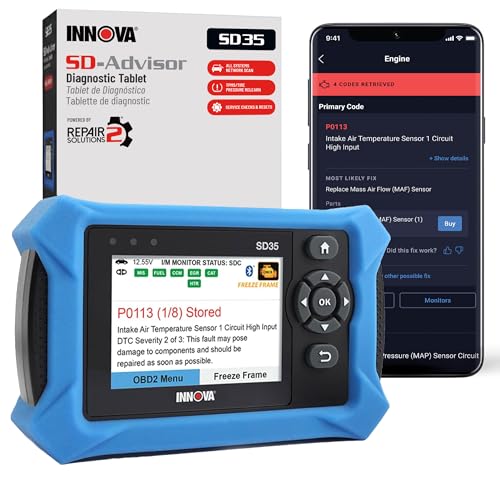
Table of Contents
Innova SD35 Review Summary
The Innova SD35 is designed for drivers, DIY mechanics, and maintenance-minded households that want one tablet-based tool for more than engine codes.
It can read and clear check-engine, ABS, SRS, and TPMS codes, scan systems including the engine and transmission, display live data, and perform selected maintenance resets.
That makes it more versatile than a basic code reader on paper.
The strongest reason to buy it is breadth: the listing combines all-system diagnostics, live readings, battery and alternator testing, TPMS checks, oil reset, and RepairSolutions2 guidance in one device.
The important qualification is coverage.
Innova says vehicle and feature compatibility may vary, so buyers should use the manufacturer’s Coverage Checker before purchase.
The SD35 is best for people who will actually use its wider diagnostic functions, not someone who only wants a simple light reader.
Review Scorecard
| Category | Score | Editorial assessment |
|---|---|---|
| System coverage | 9/10 | Supports engine, transmission, ABS, SRS, TPMS, and other systems, subject to vehicle coverage. |
| Live-data usefulness | 8/10 | Provides real-time RPM, fuel trims, temperatures, and oxygen-sensor performance readings. |
| Service functions | 8/10 | Includes TPMS checks, oil-light reset, and other service resets. |
| Ease of use | 8/10 | The tablet format and high-resolution display are intended to make diagnostics easier to navigate. |
| Repair guidance | 8/10 | The included RepairSolutions2 app offers verified-fix guidance, suggested parts, and cost estimates. |
| Compatibility confidence | 6/10 | Broad 1996-and-newer coverage is advertised, but exact functions vary by vehicle. |
| Ownership value | 8/10 | The listing specifies no subscriptions and includes a one-year limited warranty. |
Key Features and Specifications of Innova SD35
The SD35 is an OBD2 diagnostic tablet from Innova, model number SD35, with an included OBD2 cable.
Its purpose is broader vehicle diagnosis rather than a single check-engine function.
The listing identifies compatibility with most 1996-and-newer cars and trucks, including examples from Toyota, Ford, Honda, Chevrolet, Nissan, and Dodge.
That should be treated as general coverage guidance, not a guarantee that every function works on every model.
Its all-system capability is the central feature.
In addition to engine diagnostics, the scanner is described as working with transmission, ABS, SRS, TPMS, and more.
Reading and clearing codes across those systems can give a buyer a wider view of a warning light or fault than an entry-level engine-only reader.
Clearing a code, however, does not repair the underlying problem; it is most useful after diagnosis or repair.
The live-data function adds context to stored codes.
According to the listing, the SD35 can show real-time RPM, fuel trims, temperature readings, and oxygen-sensor performance.
These values can help a knowledgeable user compare symptoms with operating data and decide what to investigate next.
They are most useful when the buyer understands what the readings mean and avoids treating one value as a complete diagnosis.
The device also includes vehicle-maintenance functions.
It can test the car battery and alternator, check TPMS sensors, reset an oil light, and perform other service resets.
Those features make it appealing for routine ownership and maintenance work, especially for someone who wants one tool to cover both fault-code reading and selected service tasks.
RepairSolutions2 is another part of the package.
Innova says the free app works on iPhone and Android and provides verified fixes based on real-world repairs from ASE-certified mechanics, along with step-by-step guidance, suggested parts, and cost estimates.
The listing says the app is used by 4 million people and carries no extra subscription fees.
This guidance can shorten the path from a code to a repair plan, although buyers should still verify the diagnosis and parts for their specific vehicle.
The stated hardware details are straightforward: brand Innova, model SD35, one included OBD2 cable, and a one-year limited manufacturer warranty.
The listing calls the display high resolution and describes the interface as user-friendly.
It does not provide detailed dimensions, weight, processor information, or a complete vehicle-function matrix, so those should not be assumed from the general feature list.
Pros and Cons of Innova SD35
Pros
- All-system ambition: The SD35 is designed to scan engine, transmission, ABS, SRS, TPMS, and additional systems rather than stopping at basic engine codes.
- Useful live data: RPM, fuel trims, temperatures, and oxygen-sensor performance can give more diagnostic context than a code number alone.
- Maintenance coverage: Battery and alternator tests, TPMS checks, oil reset, and other service resets expand its usefulness beyond warning-light diagnosis.
- Repair guidance included: RepairSolutions2 is presented as a free app with step-by-step information, suggested parts, and cost estimates.
- No subscription claim: The listing specifically positions the SD35 and its app as free from extra subscription fees.
- Broad target vehicle range: The stated compatibility focus is cars and trucks from 1996 onward, with coverage examples spanning several major brands.
Cons
- Coverage is not universal: The manufacturer says vehicle and feature coverage may vary, so the buyer must check compatibility before ordering.
- Not a substitute for mechanical skill: Live readings and code clearing are tools for diagnosis, not proof that a particular part is bad.
- Limited published specifications: The supplied product information does not detail dimensions, screen size, refresh behavior, or every supported reset.
- Some functions may be vehicle-dependent: A feature listed for the scanner may not be available on every year, trim, or system.
- More tool than casual owners need: If your only goal is reading one engine code, the broader tablet functions may be unnecessary.
Who Should Buy Innova SD35?
The best buyer is a DIY vehicle owner who wants to investigate several warning systems and see live operating data.
It also suits a household with multiple compatible cars and trucks, because its value comes from combining several diagnostic jobs in one device.
Someone who regularly handles oil-service resets, TPMS checks, battery or alternator checks, and code diagnosis will have more opportunities to use it.
It is also a reasonable fit for a careful first-time diagnostic-tool buyer who wants repair information alongside the scan results.
RepairSolutions2 may be helpful when a code is unfamiliar, while the tablet display is intended to make the information easier to review than a very basic reader.
Skip it if you have not verified your vehicle in Innova’s Coverage Checker, if you need a guaranteed function for a particular make and year, or if you expect a scanner to identify and fix a mechanical fault automatically.
Buyers who only want a minimal check-engine reader may prefer a simpler product.
Professional technicians with requirements beyond the published SD35 functions should also compare the exact coverage and workflow against their shop needs.
How the Innova SD35 Fits Real-World DIY Diagnosis
From code reading to context
The SD35’s main advantage is the step between seeing a fault code and deciding what to inspect.
Live RPM, fuel trims, temperatures, and oxygen-sensor performance can help organize that investigation, provided the user interprets the readings alongside the vehicle’s symptoms.
One tool for several warning systems
Engine-only readers leave owners looking elsewhere when ABS, SRS, or TPMS warnings appear.
The SD35 is built around broader system access, so it can be a more practical household tool when those systems matter and the particular vehicle supports them.
Maintenance between repairs
Battery and alternator testing, TPMS checks, oil reset, and other service resets give the scanner a role after a repair is finished.
That combination is more useful for ongoing vehicle ownership than a reader that only displays a code.
The compatibility checkpoint
The most important buying step is checking the exact vehicle before purchase.
The listing repeatedly qualifies coverage, which means the advertised system list should be read as capability of the tool rather than a promise for every car, truck, model year, or trim.
Alternatives to Innova SD35
If you want to compare the category, consider these Amazon-searchable alternatives:
- FOXWELL automotive diagnostic scanners are worth comparing if you want another brand’s range of code-reading and service-tool options.
- ANCEL all-system OBD2 scanners provide another product line to review when broader module coverage is a priority.
- Autel MaxiCOM diagnostic scanners are a comparison point for buyers looking at more advanced diagnostic families.
- BlueDriver Bluetooth scanners are a different format to consider if you prefer phone-connected diagnostics rather than a dedicated tablet.
Check each alternative’s exact vehicle coverage and service functions just as carefully as you would with the SD35.
Names such as all-system or professional do not by themselves guarantee support for a particular vehicle.
Is Innova SD35 Worth It?
The Innova SD35 is worth considering when you want a single, subscription-free diagnostic tablet that reaches beyond engine codes.
Its combination of engine, transmission, ABS, SRS, TPMS, live data, battery and alternator testing, service resets, and RepairSolutions2 guidance gives it a clear buyer case.
The decision depends on compatibility.
Verify your exact vehicle with Innova’s Coverage Checker before buying, then choose the SD35 if you will use its broader system access and maintenance functions.
For a DIY owner with compatible vehicles, it is a versatile diagnostic starting point; for a one-purpose code-reading job, a simpler scanner may be the better fit.