Choosing the right OBD2 scanner for Ford Explorer can make routine diagnostics faster, clearer, and far less frustrating. The best option depends on whether you want simple code reading, Ford-specific system access, or app-based convenience.
Below, we focus on scanners that fit real-world Ford Explorer ownership, from basic check-engine tools to more advanced adapters for FORScan and full-system diagnostics.
Table of Contents
- Best 10 OBD2 Scanner for Ford Explorer Picks for 2026
- Ford Full-System Specialist – ANCEL FD700 Ford-Lincoln-Mercury Diagnostic Tool
- FORScan Cable Pick – OBDLink EX FORScan OBD Adapter
- Ford Value Scanner – ANCEL FD500 Full-System Code Reader
- Wireless Premium Adapter – OBDLink MX+ Bluetooth Scanner
- Ford-Focused DIY Diagnostic Cable – FORScan USB Adapter for Ford, Lincoln, Mazda, Mercury
- Wireless Phone-Based Scanner – BlueDriver Pro Next-Gen Bluetooth OBD2 Scanner
- Simple Budget Code Reader – ANCEL AD410 Check Engine Scanner
- Battery-Tested DIY Pick – Innova 5210 OBD2 Scanner & Engine Code Reader
- Best Heavy-Duty Pick – ANCEL AD310 Classic Enhanced Scanner
- App-Connected Advanced Pick – BlueDriver Bluetooth Pro OBDII Scan Tool
- How We Picked the Best OBD2 Scanner for Ford Explorer
- Quick Comparison
- Key Buying Factors for OBD2 Scanner for Ford Explorer
- Who Should Buy Which OBD2 Scanner for Ford Explorer?
Best 10 OBD2 Scanner for Ford Explorer Picks for 2026
Ford Full-System Specialist
ANCEL FD700 Ford-Lincoln-Mercury Diagnostic Tool

- Full-system Ford diagnostics for major modules
- 33 advanced service resets, including battery registration
- Also handles standard OBD2 functions on 1996+ vehicles
Best For: Ford Explorer owners who want Ford-specific diagnostics and maintenance resets
FORScan Cable Pick
OBDLink EX FORScan OBD Adapter
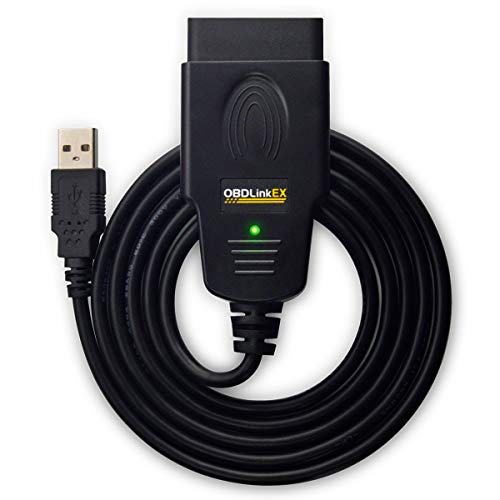
- Built for FORScan and recommended by the FORScan team
- Supports all Ford protocols, modules, and advanced features
- Fast wired connection with strong data reliability
Best For: Explorer owners using FORScan on Windows for advanced Ford diagnostics
Wireless Premium Adapter

- Bluetooth adapter for iPhone, Android, and Windows
- Recommended for FORScan and other popular diagnostic apps
- Enhanced Ford support with added live parameters and protections
Best For: Explorer owners who want wireless, app-based diagnostics
Wireless Phone-Based Scanner
BlueDriver Pro Next-Gen Bluetooth OBD2 Scanner

- Bluetooth scanner for iPhone and Android
- No subscription fees, with repair reports and live data
- Enhanced diagnostics on supported vehicles including ABS and SRS
Best For: Ford Explorer owners who want app-based diagnostics and wireless convenience
Simple Budget Code Reader
ANCEL AD410 Check Engine Scanner

- No app or battery needed; powered by the OBD2 port
- Reads and clears engine codes with live data and readiness checks
- Best for basic check engine light troubleshooting
Best For: Ford Explorer owners who want a simple, low-cost basic code reader
Battery-Tested DIY Pick
Innova 5210 OBD2 Scanner & Engine Code Reader

- Reads/clears engine codes and some ABS coverage
- Live data plus oil reset and readiness checks
- Built-in battery tester with app-based repair help
Best For: DIY owners who want a scanner with battery testing and maintenance features
Best Heavy-Duty Pick
ANCEL AD310 Classic Enhanced Scanner

- Reads and clears emission-related codes fast
- Shows live data, freeze frame, and readiness
- Compact, no-battery design for basic diagnostics
Best For: Budget buyers who want a basic, easy check engine light reader
App-Connected Advanced Pick
BlueDriver Bluetooth Pro OBDII Scan Tool

- Wireless Bluetooth scanner for iPhone and Android
- Reads/clears check engine plus ABS, SRS, TPMS
- Includes live data and repair reports with fixes
Best For: Drivers who want advanced wireless diagnostics and app guidance
Ford Full-System Specialist – ANCEL FD700 Ford-Lincoln-Mercury Diagnostic Tool
If you want an OBD2 scanner for Ford Explorer that goes beyond basic code reading, the ANCEL FD700 is built around Ford, Lincoln, and Mercury vehicles. It scans all major vehicle systems, supports a wide range of Ford service functions, and still includes standard OBD2 features for other 1996+ vehicles, making it a practical all-around garage tool.
Best For: Ford Explorer owners who want Ford-specific diagnostics plus maintenance resets in one scanner.
Pros:
- Designed for Ford, Lincoln, and Mercury with full-system scanning across modules like Engine, ABS, SRS, TPMS, SAS, TCM, and more.
- Includes 33 advanced service functions such as BMS reset, EPB maintenance, ABS bleed, oil reset, DPF regeneration, and battery registration.
- Also works as a universal OBD2 scanner for other 1996+ vehicles with code reading, clearing, live data, and EVAP testing.
- Compatible with many Ford models from 1996 to 2019, including Explorer.
Cons:
- Ford-focused features are limited to compatible Ford, Lincoln, and Mercury vehicles.
- Some advanced functions depend on the exact vehicle and system support.
- May be more scanner than a casual driver needs if they only want basic engine-code checks.
Overall, the FD700 is a strong choice if you want a Ford Explorer scanner that can handle deeper diagnostics and routine service resets. It is especially appealing for owners who prefer one tool that covers both model-specific maintenance and standard OBD2 tasks.
FORScan Cable Pick – OBDLink EX FORScan OBD Adapter
For a Ford Explorer owner using FORScan, this OBD2 scanner for Ford Explorer is really a dedicated adapter rather than a standalone code reader. The OBDLink EX is designed to work with FORScan-compatible Ford vehicles and is recommended by the FORScan team, which makes it a smart pick if you want dealership-level access through Windows software.
Best For: Explorer owners who want the best wired FORScan adapter for advanced Ford diagnostics on Windows.
Pros:
- Custom-designed for FORScan and recommended by the FORScan team.
- Supports all Ford protocols, modules, and advanced FORScan features.
- Electronic switch allows access to all CAN buses simultaneously for advanced functions.
- Rock-solid connection and fast throughput help avoid dropped packets and data corruption.
Cons:
- Requires Windows and FORScan; it is not a standalone handheld scanner.
- Best suited to users who are comfortable working with software-based diagnostics.
- Not intended as a universal all-in-one scanner for every vehicle brand.
If you are focused on Ford-specific diagnostics and want deeper access than a basic reader can provide, the EX stands out. It is especially useful for Explorer owners who plan to use FORScan for advanced module work and reliable communication.
Ford Value Scanner – ANCEL FD500 Full-System Code Reader
If you want a practical OBD2 scanner for Ford Explorer ownership without moving into higher-priced dealer tools, the ANCEL FD500 covers the essentials well. It is built for Ford, Lincoln, and Mercury vehicles, reads and clears codes across key systems, and adds useful service functions for common maintenance jobs.
Best For: Ford Explorer drivers who want full-system scanning and key maintenance resets at a more approachable price.
Pros:
- Ford-focused full-system diagnostics for Engine, ABS, SRS, Transmission, HVAC, 4WD, and more.
- Includes helpful service features like throttle/KAM, oil reset, EPB maintenance, and battery registration.
- Compatible with many post-1996 Ford Group vehicles, including Explorer and F-Series models.
- Includes lifetime free updates and one-year warranty support.
Cons:
- Advanced features are limited to supported Ford Group vehicles.
- Some compatibility depends on the vehicle and latest update status.
- Not as specialized for FORScan workflows as a dedicated adapter.
The FD500 is a good middle-ground option for Explorer owners who want broader system coverage and useful maintenance functions. It balances Ford-specific capability with universal OBD2 basics, making it easy to recommend for home use.
Wireless Premium Adapter – OBDLink MX+ Bluetooth Scanner
For shoppers comparing an OBD2 scanner for Ford Explorer with app-based convenience, the OBDLink MX+ is a premium Bluetooth adapter that turns a phone, tablet, or Windows PC into a diagnostic tool. It is recommended for FORScan and supports enhanced OEM coverage for Ford, which makes it a flexible pick if you want wireless access and live data.
Best For: Explorer owners who want a wireless adapter for app-based diagnostics and live vehicle data.
Pros:
- Works with iPhone, Android, and Windows devices.
- Recommended adapter for FORScan and other major apps like Torque, BimmerCode, and Carista.
- Enhanced OEM support for Ford plus extra live parameters such as ABS, SRS, and TPMS.
- Includes over-voltage and battery drain protection, plus firmware updates.
Cons:
- Requires a compatible app and device; it is not a standalone handheld scanner.
- Feature depth depends on the software you pair it with.
- Compatibility and supported functions should be checked before purchase.
The MX+ is a strong choice if you prefer a compact wireless setup over a dedicated scan tool. For Explorer owners who already use diagnostic apps, it offers a convenient way to access more data and Ford-friendly features.
Ford-Focused DIY Diagnostic Cable – FORScan USB Adapter for Ford, Lincoln, Mazda, Mercury
If you want an OBD2 scanner for Ford Explorer diagnostics that goes beyond basic code reading, this FORScan-compatible USB cable is built for Ford-family vehicles. It is aimed at DIY owners who want to read and clear trouble codes, identify fault descriptions, and use FORScan on a Windows laptop for deeper vehicle checks and some programming functions, depending on the vehicle and software limits.
Best For: Ford Explorer owners who use a Windows PC and want FORScan-based diagnostics with a wired USB connection.
Pros:
- Designed for Ford, Lincoln, Mazda, and Mercury vehicles, including the Explorer
- Reads and clears DTCs from systems such as engine, transmission, and ABS
- Supports MS-CAN/HS-CAN switching and higher bus speeds for compatible use
- Works with FORScan, with some programming features depending on vehicle and license
Cons:
- Windows only; not compatible with Mac, Chromebook, tablets, or phones
- FORScan software is downloaded separately and some features need an Extended License
- Not intended for non-Ford protocol vehicles such as the Explorer EV CX740 noted by the seller
For Ford Explorer owners who are comfortable using a laptop, this is a practical wired diagnostic tool with stronger vehicle-family focus than a generic code reader. It is best when you want more control through FORScan rather than a simple handheld scan-and-clear device.
Wireless Phone-Based Scanner – BlueDriver Pro Next-Gen Bluetooth OBD2 Scanner
If you want an OBD2 scanner for Ford Explorer use that feels modern and easy, BlueDriver Pro turns your phone into a capable diagnostic tool. It connects wirelessly, reads and clears many more codes than a basic reader, and adds app-based repair reports, live data, and support for enhanced diagnostics on supported vehicles.
Best For: Ford Explorer drivers who want app-based diagnostics, repair reports, and no cable clutter.
Pros:
- Bluetooth scanner works with iPhone and Android
- No subscription fees, with free app updates included
- Supports enhanced diagnostics such as ABS, SRS, TPMS, and transmission on supported vehicles
- Includes technician-verified repair reports matched to your VIN
Cons:
- Requires a phone or tablet to use
- Enhanced features depend on vehicle support
- Not as simple as a standalone screen-based code reader if you want a no-app setup
For Explorer owners who want a compact, wireless option with more guidance than a basic scanner, BlueDriver Pro is the most flexible choice here. It is especially appealing if you prefer app-based troubleshooting and plan to use one scanner across multiple household vehicles.
Simple Budget Code Reader – ANCEL AD410 Check Engine Scanner
If you mainly need an OBD2 scanner for Ford Explorer check engine light troubleshooting, the ANCEL AD410 keeps things straightforward. It is a plug-in, screen-based code reader that reads and clears engine-related fault codes, shows live data, and helps you check smog readiness without needing a phone app or charging.
Best For: Ford Explorer owners who want a simple, inexpensive, no-app scanner for basic engine diagnostics.
Pros:
- No app, Bluetooth, or battery required; powered directly by the OBD2 port
- Reads and clears engine-related codes with built-in code definitions
- Shows live data, freeze frame, I/M readiness, O2 sensor, and EVAP tests
- Compatible with most 1996+ OBD2 vehicles, including many SUVs and light trucks
Cons:
- Does not support ABS, SRS, transmission, bidirectional control, or service reset
- Engine and emission codes only, so it is more limited than advanced scanners
- Not a vehicle-specific Ford tool like a FORScan-based adapter
The AD410 is a good pick if your priority is quick, affordable access to basic diagnostics on a Ford Explorer. It is less advanced than the other options here, but its simplicity makes it a solid everyday code reader for owners who just want to understand a warning light.
Battery-Tested DIY Pick – Innova 5210 OBD2 Scanner & Engine Code Reader
If you want an OBD2 scanner for Ford Explorer ownership that does more than clear a check engine light, the Innova 5210 is a practical all-around pick. It reads and clears engine codes, offers live data, supports oil reset, and adds a built-in battery tester, which is helpful for spotting charging issues before they leave you stranded. Coverage can vary by vehicle, so it’s smart to verify your exact Explorer year and trim first.
Best For: DIY drivers who want code reading, live data, and battery testing in one tool.
Pros:
- Reads and clears engine codes, with ABS coverage that may vary by vehicle
- Shows live data like RPM, coolant temperature, fuel trims, and oxygen sensor readings
- Includes oil reset and smog/drive-cycle readiness checks
- Works with the RepairSolutions2 app for verified fixes and repair guidance
Cons:
- Feature coverage can vary, so compatibility should be checked for your specific vehicle
- ABS support is not guaranteed on every application
- App-based guidance is useful, but it is still a basic scanner compared with advanced bidirectional tools
The Innova 5210 is a solid middle-ground choice if you want useful diagnostics without paying for a full pro-level scan tool. Its combination of live data, oil reset, and battery testing makes it especially handy for routine Explorer maintenance.
Best Heavy-Duty Pick – ANCEL AD310 Classic Enhanced Scanner
For a straightforward OBD2 scanner for Ford Explorer troubleshooting, the ANCEL AD310 keeps things simple: plug it in, read the fault code, clear it after repairs, and move on. It supports common OBDII protocols and provides live data, freeze frame, and I/M readiness, making it a good no-frills option for emissions-related check engine light issues. Just note that it only handles OBDII diagnosis, so it won’t cover non-emissions engine faults.
Best For: Drivers who want an affordable, easy-to-use check engine light reader.
Pros:
- Reads and clears emission-related trouble codes quickly
- Shows live data, freeze frame, and I/M monitor readiness
- Compact, lightweight design with no batteries or charger required
- Supports common OBDII protocols and broad 1996+ vehicle compatibility
Cons:
- Only supports emission-related OBDII diagnostics
- Does not diagnose vehicles with OBDI interfaces
- Lacks advanced features like app connectivity or enhanced module coverage
The AD310 is a good fit if you mainly want a simple code reader for basic Explorer maintenance checks. It’s compact, fast, and practical, but it is not meant for deeper diagnostics.
App-Connected Advanced Pick – BlueDriver Bluetooth Pro OBDII Scan Tool
If you want an OBD2 scanner for Ford Explorer diagnostics with more depth, BlueDriver stands out for its app-based, wireless approach. It reads and clears check engine codes and adds enhanced diagnostics for ABS, airbag, SRS, TPMS, and thousands of other issues on supported vehicles. Since it plugs into the OBDII port and connects through your phone, it’s a clean setup with no wires hanging in the cabin.
Best For: Drivers who want advanced app-based diagnostics and wireless convenience.
Pros:
- Reads and clears check engine, ABS, airbag, SRS, and TPMS codes on supported vehicles
- Includes live data and unlimited repair reports with possible causes and fixes
- Bluetooth connection works with iPhone and Android through the BlueDriver app
- No subscription fees, add-ons, or account required
Cons:
- Advanced diagnostics are limited to supported makes and modules
- Requires a phone or tablet to use
- More expensive than a basic code reader
BlueDriver is the strongest choice here if you want more than simple code reading and like having repair help built into the app. It’s especially appealing for Explorer owners who want advanced diagnostics without moving to a bulky professional scan tool.
How We Picked the Best OBD2 Scanner for Ford Explorer
For this roundup, we prioritized Ford Explorer compatibility, diagnostic depth, ease of use, and value. We also looked at whether a tool works well for Ford-specific modules, supports live data, and offers practical features like battery testing, ABS/SRS access, or app connectivity.
Because the right OBD2 Scanner for Ford Explorer depends on your experience level, we included both beginner-friendly handheld readers and more advanced wireless adapters for owners who want deeper access.
Quick Comparison
If you want the simplest experience, choose a basic handheld scanner for reading and clearing check-engine codes. If you want more system coverage, look for a Ford-focused model with access to ABS, SRS, transmission, and 4WD data. For enthusiasts and DIY diagnostics, Bluetooth or USB adapters paired with FORScan can unlock much more detail.
Key Buying Factors for OBD2 Scanner for Ford Explorer
Ford-Specific Coverage
Generic code readers can handle emissions-related faults, but a Ford Explorer often benefits from a scanner that can communicate with more vehicle modules. If you need deeper troubleshooting, choose one designed for Ford, Lincoln, and Mercury vehicles or one known to work well with FORScan.
Connection Type
Handheld scanners are simple and self-contained. Bluetooth models are convenient if you prefer using a phone app, while USB adapters are often best for laptop-based diagnostics and advanced Ford-specific functions.
System Access
Think beyond the check-engine light. Many Explorer owners want access to ABS, SRS, transmission, 4WD, and live sensor data. A more capable scanner can save time by pointing you toward the right repair faster.
Ease of Use
If you only need occasional code checks, pick a straightforward reader with a clear screen and simple menus. If you plan to diagnose multiple issues or perform resets, a more advanced app-based tool may be worth the learning curve.
Who Should Buy Which OBD2 Scanner for Ford Explorer?
Budget-minded drivers should start with a basic universal scanner for quick fault-code reads and clears. Ford owners who want broader system coverage should look at Ford-focused tools or FORScan-compatible adapters. Tech-savvy DIYers and frequent troubleshooters will usually get the most value from Bluetooth or USB options that pair with smartphone or computer software.
In short, the best OBD2 Scanner for Ford Explorer is the one that matches your repair habits, your device preference, and how deeply you want to diagnose the vehicle.