A good head-up display can keep essential driving information in your sight line instead of making you glance down at the instrument cluster. The best GPS car head-up displays show speed clearly while adding useful alerts and trip data.
We compared 10 options ranging from simple GPS speedometers to dual-system OBD2 units and feature-rich displays with smartphone integration. This guide focuses on visibility, setup, compatibility, and the features that matter on real roads.
Table of Contents
- Best 10 Gps Car Head Up Displays Picks for 2026
- Best Dual-Mode Value – wiiyii P6 OBD2+GPS HUD
- Best Connected All-in-One – Upgraded Wireless CarPlay HUD
- Best Simple GPS Speedometer – KUOWEIHUD K1 Green
- Best Diagnostic Flexibility – MH OBD2+GPS Gauge HUD
- Compact GPS Pick – wiiyii M19 Car HUD
- Solar-Powered Option – Wireless Solar GPS HUD
- Precision Display Pick – K4 GPS Car HUD
- Large-Screen Safety Monitor – 5.5-Inch GPS Speedometer HUD
- Dual-Satellite Plug-and-Play Pick – GPS Speedometer HUD
- Color Windshield Projector – M22 GPS Speedometer HUD
- How We Picked the Best Gps Car Head Up Displays
- Quick Comparison
- Key Buying Factors for GPS Car Head-Up Displays
- Who Should Buy Which Gps Car Head Up Displays?
Best 10 Gps Car Head Up Displays Picks for 2026
Best Dual-Mode Value
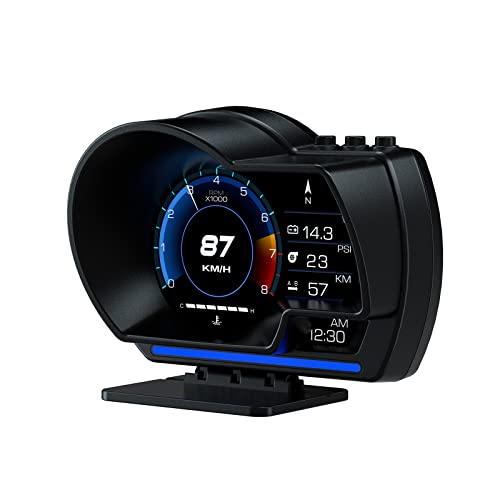
- OBD2 and GPS data in one display
- 10 interfaces with multiple vehicle readings
- Adjustable dashboard or windshield mounting
Best For: Drivers wanting speed, diagnostics, and customizable alerts
Best Connected All-in-One

- Wireless CarPlay and Android Auto
- GPS navigation and diagnostic functions
- Dual power options with heat protection
Best For: Drivers wanting smartphone integration and broad compatibility
Best Simple GPS Speedometer

- Large green MPH/KM/H speed display
- 10Hz refresh with auto brightness
- USB-C plug-and-play installation
Best For: Drivers wanting clear, dedicated GPS speed readings
Best Diagnostic Flexibility

- OBD2 and GPS modes with extensive live data
- Scans and clears engine fault codes
- Custom speed, temperature, voltage, and RPM alerts
Best For: Compatible vehicles needing detailed monitoring and diagnostics
Compact GPS Pick

- Compact 3.8-inch windshield display
- Speed, voltage, altitude, and trip data
- Overspeed and fatigue-driving alarms
Best For: Drivers wanting a small, multifunction GPS HUD
Solar-Powered Option

- Solar and USB charging options
- LCD shows speed, time, temperature, and altitude
- Adjustable overspeed and fatigue reminders
Best For: Drivers who value flexible, rechargeable power
Precision Display Pick

- GPS+BDS reception with 10 Hz refresh
- Manual speed calibration and MPH/KM/H switching
- Adjustable brightness and overspeed alert
Best For: Drivers prioritizing accurate, readable speed updates
Large-Screen Safety Monitor

- 5.5-inch display shows speed and driving data
- Overspeed and fatigue-driving alerts
- Automatic brightness adjustment
Best For: Drivers wanting a large, feature-rich safety display
Dual-Satellite Plug-and-Play Pick

- GPS and Beidou dual-mode positioning
- Three overspeed alarm thresholds
- Automatic brightness and power-off
Best For: Drivers prioritizing simple setup and flexible alerts
Color Windshield Projector

- Projects speed and trip data toward the windshield
- MPH and KM/H support with overspeed alert
- Automatic startup and shutdown
Best For: Drivers wanting a simple windshield-focused HUD
Best Dual-Mode Value – wiiyii P6 OBD2+GPS HUD
The wiiyii P6 is a practical choice among gps car head up displays for drivers who want both vehicle data and GPS speed in one unit. Its OBD2+GPS setup can show speed, voltage, fuel consumption, RPM, and water temperature, while the adjustable mounting options make placement straightforward.
Best For: Drivers seeking a feature-rich OBD2 and GPS display with speed alerts and diagnostic data.
Pros:
- Combines OBD2 vehicle data with GPS functionality.
- Offers 10 selectable interfaces and multiple readings.
- Includes dashboard and windshield installation options.
- Automatically adjusts brightness and changes ambient lighting for overspeed alerts.
Cons:
- OBD2 features depend on vehicle compatibility.
- The supplied notes do not specify compatibility with every vehicle type.
Choose the P6 if you want more than a simple speed readout. It is particularly useful when diagnostic information and customizable alerts matter, though vehicles without a compatible OBD2 protocol use its GPS functions only.
Best Connected All-in-One – Upgraded Wireless CarPlay HUD
This upgraded model stands out among gps car head up displays by pairing GPS navigation functionality with wireless CarPlay and Android Auto. It also includes diagnostic features, speed alerts, dual power options, and a high-temperature design for broad vehicle compatibility.
Best For: Drivers who want navigation connectivity, smartphone integration, and a plug-and-play installation.
Pros:
- Supports wireless CarPlay and Android Auto.
- Works with sedans, trucks, SUVs, RVs, pickups, older vehicles, and modified vehicles according to the supplied notes.
- Includes OBD and cigarette-lighter power cables.
- Designed to operate from -20°C to 75°C with overheat protection.
Cons:
- Requires Bluetooth and Wi-Fi enabled on the phone for the HUD connection.
- The compact display still requires dashboard placement and a power connection.
This is the most versatile option in the group for users who want a modern connected driving interface rather than a standalone speedometer. Its broad compatibility and dual power setup simplify installation, while the phone connection adds setup steps.
Best Simple GPS Speedometer – KUOWEIHUD K1 Green
The KUOWEIHUD K1 is a straightforward pick among gps car head up displays, focusing on fast, readable speed information. Its large green digits reflect onto the windshield, refresh up to 10 times per second, and support both MPH and KM/H.
Best For: Drivers who want a simple GPS speed display with quick installation and clear large numbers.
Pros:
- Uses GPS satellite positioning for real-time speed readings.
- 10Hz refresh rate provides responsive speed updates.
- Automatic brightness adjustment supports day and night visibility.
- USB-C plug-and-play setup includes reflective windshield film.
Cons:
- GPS signals may weaken in tunnels or underground garages.
- Certain protective windshield films may interfere with GPS reception.
- Its supplied features focus primarily on speed rather than vehicle diagnostics.
The K1 is a good fit when simplicity is more important than a long list of measurements. It avoids complicated wiring and keeps the display focused, but GPS-dependent operation can be interrupted in signal-blocked locations.
Best Diagnostic Flexibility – MH OBD2+GPS Gauge HUD
The MH HUD is designed for drivers who want detailed information from their vehicle as well as GPS speed. As one of the more data-focused gps car head up displays, it can show readings such as RPM, water temperature, voltage, altitude, compass direction, and driving time, with fault-code scanning and configurable alerts.
Best For: OBDII-compatible vehicle owners who want extensive live data, diagnostics, and adjustable warning thresholds.
Pros:
- Offers both OBD2 diagnostic and GPS modes.
- Displays a broad range of driving and engine data.
- Can scan and clear engine fault codes and read data streams.
- Provides adjustable speed, temperature, voltage, and RPM alarms.
Cons:
- OBD2 compatibility is limited to qualifying OBDII/EOBD vehicles produced after 2008.
- The supplied notes list incompatibilities including diesel, hybrid, pickup, RV, and several vehicle brands.
- Vehicles without a compatible OBD2 protocol receive GPS functionality only.
The MH is the strongest choice here for hands-on vehicle monitoring and basic fault-code functions, provided your car meets the compatibility requirements. Check the listed exclusions carefully before buying, especially if you drive a diesel, hybrid, pickup, or RV.
Compact GPS Pick – wiiyii M19 Car HUD
For drivers comparing gps car head up displays, the wiiyii M19 combines a compact 3.8-inch windshield projection with GPS speed readings and several useful trip metrics. Its sunshine hood is designed to reduce glare, while plug-and-play cigarette-lighter power keeps installation simple.
Best For: Drivers who want a small, multifunction HUD for cars, trucks, motorcycles, or bicycles.
Pros:
- Compact design helps minimize obstruction of the driving view.
- Displays speed, voltage, clock, direction, altitude, driving time, and distance.
- Includes overspeed and fatigue-driving alarms with adjustable speed units.
- Uses GPS satellite positioning and includes CE, FCC, and RoHS certification.
Cons:
- Power is supplied through a vehicle cigarette lighter.
- The display is relatively small at 3.8 inches.
The M19 is a practical choice when compact size and broad trip information matter more than a larger display. Its included reflective film and anti-slip pad support a straightforward setup.
Solar-Powered Option – Wireless Solar GPS HUD
This solar-powered model is one of the more flexible gps car head up displays for drivers who prefer fewer cable connections. It uses GPS positioning and a large LCD to show speed, time, temperature, altitude, and other information, with USB power available when needed.
Best For: Drivers seeking a rechargeable HUD with solar and USB power options.
Pros:
- Supports both solar charging and USB power.
- Displays speed, time, temperature, altitude, and vehicle information.
- Large-font LCD is designed for easy viewing in daytime or nighttime conditions.
- Offers adjustable overspeed and fatigue-driving reminders.
Cons:
- The supplied notes do not specify the display dimensions.
- Solar charging performance can depend on available light.
Choose this model if dual-power convenience is a priority. Its built-in solar panel and brightness-aware LCD make it a useful fit for drivers who want a low-maintenance display with basic trip and safety information.
Precision Display Pick – K4 GPS Car HUD
The K4 stands out among gps car head up displays for its dual GPS+BDS reception, 10 Hz refresh rate, and speed-calibration function. It connects through USB, supports MPH or KM/H, and provides adjustable brightness plus a large, easy-to-read display.
Best For: Drivers who prioritize fast satellite updates, readable speed data, and calibration control.
Pros:
- Dual-mode GPS+BDS positioning can receive up to 32 satellite signals.
- 10 Hz refresh rate supports rapid speed updates.
- Manual speed calibration helps match the vehicle dashboard.
- Offers adjustable brightness, MPH/KM/H switching, and a custom overspeed alert.
Cons:
- USB power requires an available vehicle power source.
- GPS reception may be affected in tunnels, underground garages, severe weather, or behind metallic windshield film.
With its calibration feature and high-refresh satellite positioning, the K4 is a strong fit for drivers who want more control over speed accuracy. The anti-reflective shading and brightness adjustment also support day-to-night readability.
Large-Screen Safety Monitor – 5.5-Inch GPS Speedometer HUD
For drivers comparing gps car head up displays, the SinoTrack stands out with its extra-large 5.5-inch screen and broad selection of at-a-glance data. It displays speed, driving time, mileage, time, and direction, while automatic brightness adjustment helps maintain visibility in changing light.
Best For: Drivers who want a large display with fatigue and overspeed reminders.
Pros:
- Large 5.5-inch screen shows multiple driving details simultaneously.
- Includes overspeed and four-hour fatigue-driving alerts.
- Automatic light sensing adjusts screen brightness for daytime and nighttime use.
- One-button operation and a dual-core processing setup are designed for responsive operation.
Cons:
- It must use a 5V power supply; a higher voltage is prohibited.
- The trip distance does not retain or accumulate after the vehicle is powered off.
This is a practical choice when screen size and safety reminders matter more than advanced navigation information. Its broad data display is useful, although buyers should plan around the limited mileage memory and strict power requirement.
Dual-Satellite Plug-and-Play Pick – GPS Speedometer HUD
This model is a straightforward option for shoppers seeking gps car head up displays with quick setup and stable positioning. Its GPS and Beidou dual-mode chip supports speed, time, and direction data, while USB power and automatic shutdown keep daily use simple.
Best For: Drivers who want plug-and-play operation, multiple alarm settings, and automatic day-night brightness.
Pros:
- GPS and Beidou reception is designed for faster satellite searching and stable signals.
- Plugs into a vehicle’s 5V USB interface or a cigarette-lighter USB adapter.
- Offers three configurable overspeed alarm thresholds.
- Provides four display modes, including speed, compass, and clock combinations.
Cons:
- The display depends on a 5V USB power source.
- Its information is limited to driving data such as speed, time, distance, and direction rather than navigation instructions.
The W3-HUD is a well-rounded everyday option for buyers who value easy installation and flexible display settings. Its automatic power-off behavior is particularly useful for vehicles that spend extended periods parked.
Color Windshield Projector – M22 GPS Speedometer HUD
The AZIJYV M22 offers a compact alternative for shoppers comparing gps car head up displays. It projects speed information toward the windshield and adds clock, travel time, distance, compass direction, and overspeed alerts, with automatic startup and shutdown linked to the vehicle.
Best For: Drivers who want a simple windshield-oriented display with speed and basic trip information.
Pros:
- Displays speed, clock, travel time, distance, and GPS compass direction.
- Supports both MPH and KM/H settings.
- Automatically powers on with the car and turns off when the car is switched off.
- Includes a reflective film to improve daytime visibility when reflections are an issue.
Cons:
- Satellite searching can be slower in garages, under overpasses, near dense buildings, or with metal window film.
- Speed is shown only after the device acquires satellites.
- A second GPS device placed nearby may affect search speed.
The M22 is appealing for drivers who prefer a focused speed display without complicated installation. Its performance depends on an unobstructed view for satellite reception, and daytime users may need the included reflective film or manual brightness adjustment.
How We Picked the Best Gps Car Head Up Displays
We evaluated these displays by looking at the information they provide, how they receive vehicle data, installation requirements, screen readability, alert features, and everyday usability. GPS-only models are generally easier to install because they work independently of the vehicle diagnostic port. OBD2 models can provide additional data, but compatibility and cable placement matter.
We also considered practical details such as MPH and KMH support, overspeed warnings, brightness control, windshield visibility, power options, and whether the unit is suitable for older or newer vehicles. Features such as wireless CarPlay, Android Auto, temperature readings, voltage monitoring, and tachometer data can be useful, but they should not outweigh clear speed display and reliable operation.
Quick Comparison
- Best for simple setup: GPS-only speedometer displays that use satellite positioning.
- Best for vehicle data: OBD2 or OBD2-plus-GPS models with diagnostic and engine readings.
- Best for larger viewing: Displays with a wide LCD panel and prominent speed digits.
- Best for connected driving: Models that add wireless CarPlay or Android Auto.
- Best for flexible use: Units supporting both MPH and KMH with adjustable alerts.
Key Buying Factors for GPS Car Head-Up Displays
GPS, OBD2, or Dual-System Operation
GPS models are usually the most universally compatible and can be moved between vehicles. OBD2 units may show richer information, including engine speed, coolant temperature, battery voltage, or fault data, but they require an accessible compatible port. Dual-system designs offer flexibility, though they can be more complex to configure.
Readability and Windshield Placement
Choose large, high-contrast digits that remain visible in daylight and do not create excessive glare at night. Check whether the display supports brightness adjustment and whether its projection or screen placement works with your dashboard and windshield angle. Position it where you can read it without blocking your view of the road.
Alerts and Display Information
Overspeed warnings are useful when they are adjustable rather than fixed. Some displays also show altitude, travel time, fatigue reminders, temperature, voltage, or tachometer readings. Prioritize the information you will actually use; a crowded screen can be less helpful than a simple speed readout.
Power, Installation, and Vehicle Fit
Confirm whether the unit uses USB, a 12-volt adapter, solar charging, or an OBD2 cable. GPS reception may take time in enclosed areas, while OBD2 installation can leave a visible cable. Review the included mounting method and verify that the display supports your preferred speed units.
Who Should Buy Which Gps Car Head Up Displays?
Choose a GPS-only model if you want the easiest installation, broad vehicle compatibility, and a dedicated speed display. Choose an OBD2 model if you want engine-related information alongside speed and your vehicle has a compatible diagnostic port. Choose a dual-system unit if you want backup positioning or more comprehensive readings.
Drivers who spend long hours on the road may prefer a larger display with fatigue or overspeed alerts. If navigation and phone connectivity are priorities, a model with wireless CarPlay or Android Auto may be worth considering. For occasional use or a second vehicle, keep things simple with a compact, low-setup GPS speedometer.