A car heads-up display can project speed and driving information near your line of sight, helping you check key data without looking down at the instrument panel.
We compared 10 popular GPS and OBD2 HUDs, focusing on display clarity, vehicle compatibility, installation, alert features, and everyday usefulness.
Table of Contents
- Best 10 Car Heads Up Display Picks for 2026
- Best Large-Screen GPS Pick – SinoTrack 5.5-Inch GPS HUD
- Best Dual-Mode Gauge – wiiyii P6 OBD2 GPS HUD
- Best Traditional OBD Display – 5.5-Inch Multi-Color HUD
- Best Feature-Rich Upgrade – wiiyii P28 Gesture-Control HUD
- Best Plug-and-Play Pick – GPS Speedometer HUD
- Best Data-Tracking Option – OBD2 and GPS HUD Gauge
- Best Windshield Projection – MAIMEIMI OBD2 HUD
- OBD2 Data Pick – wiiyii P8 Car HUD
- Simple GPS Pick – K1 USB Car HUD
- Adjustable Safety Pick – K4 GPS Car HUD
- How We Picked the Best Car Heads Up Display
- Quick Comparison
- Key Buying Factors for a Car Heads-Up Display
- Who Should Buy Which Car Heads Up Display?
Best 10 Car Heads Up Display Picks for 2026
Best Large-Screen GPS Pick

- Large screen displays speed and trip information
- GPS operation works across all vehicle types
- Overspeed and fatigue-driving alerts included
Best For: Drivers wanting a large, simple GPS speed display
Best Dual-Mode Gauge
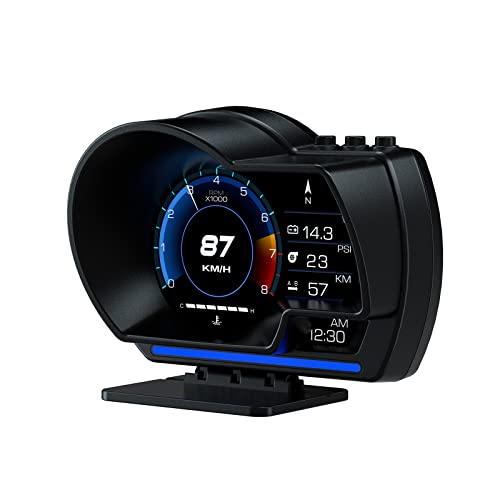
- Combines OBD2 and GPS data
- Displays speed, RPM, voltage, and temperature
- Includes flexible dashboard or windshield mounting
Best For: Drivers seeking broad vehicle data and GPS support
Best Traditional OBD Display
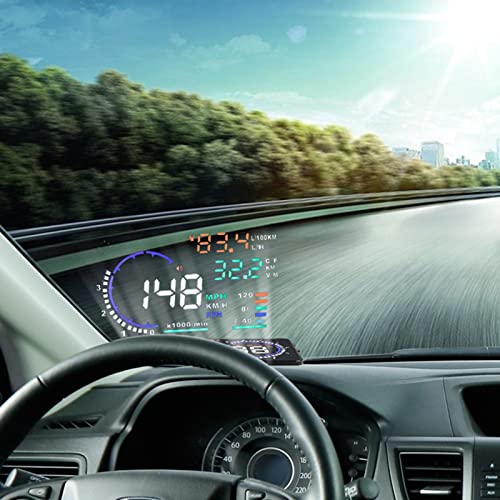
- Large multi-color OBD information display
- Shows vehicle data and fault codes
- Includes multiple configurable driving alerts
Best For: OBDII or EUOBD vehicle owners wanting broad readings
Best Feature-Rich Upgrade
wiiyii P28 Gesture-Control HUD

- Combines OBD2 and GPS vehicle data
- Offers gesture control and 13 display themes
- Adds performance tests and multiple alarms
Best For: Enthusiasts wanting advanced monitoring and customization
Best Plug-and-Play Pick

- USB installation without OBD wiring
- MPH/KM/H switching with 10Hz GPS updates
- Large display with overspeed warning
Best For: Simple speed monitoring across multiple vehicle types
Best Data-Tracking Option

- Combines OBD2 diagnostics with GPS mode
- Monitors speed, RPM, temperature, voltage, and more
- Includes fault-code scanning and customizable alarms
Best For: Compatible post-2008 vehicles needing broad driving data
Best Windshield Projection

- Projects large speed data onto the windshield
- Monitors RPM, temperature, voltage, and trip data
- Adds automatic brightness and four alarm functions
Best For: Compatible gasoline cars requiring projected, multi-data display
OBD2 Data Pick

- Shows speed plus RPM, voltage, temperature, and fuel data
- OBD2 and GPS dual-system operation
- Dashboard or A-pillar installation options
Best For: Drivers wanting vehicle data as well as speed
Simple GPS Pick

- Plug-and-play USB power without an OBD port
- Large MPH display with automatic brightness
- 10Hz GPS+BDS positioning for real-time speed
Best For: Drivers wanting a simple USB speed display
Adjustable Safety Pick

- Switches between MPH and KM/H
- Manual speed calibration and overspeed alert
- USB-powered GPS+BDS display with adjustable brightness
Best For: Drivers wanting customizable speed monitoring
Best Large-Screen GPS Pick – SinoTrack 5.5-Inch GPS HUD
For drivers who want a straightforward car heads up display with a large, readable screen, the SinoTrack combines GPS speed, direction, driving time, mileage, and satellite information. Its automatic brightness adjustment and configurable overspeed and fatigue alerts make it a practical choice for everyday journeys.
Best For: Drivers who prioritize a large GPS speed display and basic safety reminders.
Pros:
- Large 5.5-inch screen shows speed and multiple driving details simultaneously.
- GPS operation is designed for all vehicles and does not depend on OBD compatibility.
- Includes overspeed and four-hour fatigue-driving alerts.
- Automatic light-sensitive brightness adjustment supports daytime and nighttime viewing.
Cons:
- It is limited to a 5V power supply.
- Trip distance data does not accumulate or remain after the vehicle is powered off.
- Its data focus is narrower than OBD-based displays that read vehicle diagnostics.
The SinoTrack is a sensible option if clear GPS speed and simple alerts matter more than extensive engine data. Its large display is especially useful for drivers who want essential information visible at a glance.
Best Dual-Mode Gauge – wiiyii P6 OBD2 GPS HUD
The wiiyii P6 is a versatile car heads up display that combines OBD2 vehicle data with GPS functionality. It can show speed, voltage, fuel consumption, RPM, water temperature, and other information, while its adjustable mounting options make installation flexible.
Best For: Drivers who want both vehicle diagnostics and GPS speed information in one display.
Pros:
- OBD+GPS dual mode provides more data than a basic speedometer.
- OBD mode can read more than 100 types of vehicle data.
- Offers 10 display interfaces and automatic brightness adjustment.
- Includes dashboard and windshield mounting options with non-destructive installation.
Cons:
- OBD features depend on the vehicle having a compatible OBD2 protocol.
- Vehicles without OBD2 support receive GPS functionality only.
- The broad range of information may be more than some drivers need.
The P6 stands out for its combination of diagnostic information and GPS backup. It is a strong fit for drivers who want a configurable gauge display rather than speed alone, provided their vehicle supports the OBD2 functions they want to use.
Best Traditional OBD Display – 5.5-Inch Multi-Color HUD
This 5.5-inch car heads up display projects a range of OBDII or EUOBD information into the driver’s forward view. It covers speed, engine RPM, temperatures, voltage, fuel consumption, mileage, and fault codes, with brightness controls and several warning functions.
Best For: Drivers with compatible OBDII or EUOBD vehicles who want a large multi-color information display.
Pros:
- Large screen supports clear viewing of multiple vehicle measurements.
- Displays speed, RPM, water temperature, voltage, fuel consumption, mileage, and fault codes.
- Offers automatic and manual brightness adjustment.
- Provides overspeed, fatigue, high-temperature, low-voltage, and shift reminders.
Cons:
- It requires a compatible OBDII or EUOBD vehicle system.
- Its wide selection of readings may require setup to tailor the display.
- The supplied notes do not specify compatibility with vehicles lacking those interfaces.
This model is a practical choice for an OBD-equipped vehicle when you want more than speed on the windshield. Its warning functions and broad data coverage make it particularly useful for drivers who want a traditional vehicle-monitoring HUD.
Best Feature-Rich Upgrade – wiiyii P28 Gesture-Control HUD
The wiiyii P28 is a feature-rich car heads up display for drivers who want extensive vehicle data, gesture control, customizable themes, and performance testing. Its OBD+GPS system combines ECU readings with universal GPS support, while the adjustable bracket supports flexible positioning.
Best For: Performance-minded drivers who want advanced monitoring, customization, and testing features.
Pros:
- Combines OBD2 data with GPS and can display numerous vehicle metrics.
- Gesture control allows interface changes without touching the screen.
- Includes speed, temperature, voltage, fatigue, and other intelligent alarms.
- Adds acceleration, braking, dynamic-curve, and turbine-pressure displays.
Cons:
- Its extensive features may be excessive for drivers seeking only speed.
- Some OBD data depends on vehicle compatibility, while GPS provides the universal mode.
- More customization and readings can mean a longer setup process.
The P28 is the most advanced option in this group for drivers who enjoy detailed vehicle monitoring. Gesture control, multiple themes, performance tests, and configurable alarms make it better suited to enthusiasts than to buyers seeking a minimal display.
Best Plug-and-Play Pick – GPS Speedometer HUD
If you want a straightforward car heads up display focused on speed, this compact GPS speedometer is easy to install without accessing the vehicle’s OBD port. It displays MPH or KM/H in large green characters and connects through USB, making it suitable for a wide range of vehicles.
Best For: Drivers who want a simple, portable speed display for cars, trucks, SUVs, motorcycles, or golf carts.
Pros:
- Plug-and-play USB setup avoids OBD wiring.
- Switches between MPH and KM/H and uses a 10Hz GPS refresh rate.
- Large, glare-resistant display with adjustable overspeed warning.
- Automatic motion-based power-on and power-off helps limit standby drain.
Cons:
- Initial GPS lock can take 10–30 seconds.
- GPS performance is not recommended in tunnels or underground garages.
- Provides primarily speed-focused information rather than broad vehicle diagnostics.
This is a practical choice when speed visibility and universal installation matter more than engine data. Its GPS-based operation also makes it a flexible option for vehicles without a compatible OBD system.
Best Data-Tracking Option – OBD2 and GPS HUD Gauge
This car heads up display combines OBD2 vehicle data with GPS tracking, giving compatible drivers more information than a basic speedometer. It can show speed, RPM, water temperature, voltage, fuel consumption, mileage, altitude, and other readings, while also scanning and clearing engine fault codes.
Best For: Owners of compatible gasoline vehicles made after 2008 who want expanded driving data and basic fault-code functions.
Pros:
- Dual OBD2 and GPS modes provide flexible data sources.
- Displays multiple vehicle and trip metrics, including RPM, temperature, voltage, and speed.
- Supports fault-code scanning, clearing, and real-time data monitoring.
- Offers customizable units, brightness, interfaces, and several alert thresholds.
Cons:
- Compatibility is limited to OBDII/EOBD-compliant vehicles, generally after 2008.
- It is not compatible with listed diesel, hybrid, pickup, RV, and several vehicle-brand categories.
- Vehicles with incompatible OBD2 protocols may receive only GPS functions.
This model is better suited to drivers who want an information-rich gauge rather than speed alone. Confirm vehicle compatibility before buying, especially if the car uses a diesel, hybrid, modified ECU, or one of the listed unsupported systems.
Best Windshield Projection – MAIMEIMI OBD2 HUD
For drivers who prefer projected information, this car heads up display uses the windshield as its viewing surface and presents speed data in a large format. Its OBD2 connection also provides readings such as RPM, water temperature, voltage, and trip information for compatible gasoline vehicles.
Best For: Drivers with compatible post-2008 gasoline cars who want windshield projection, automatic brightness, and several driving alerts.
Pros:
- Projects key speed information onto the windshield to reduce downward glances.
- Displays speed, RPM, trip data, water temperature, voltage, and fuel-related readings.
- Automatic brightness adjustment helps adapt the display for day or night driving.
- Includes overspeed, fatigue-driving, speed, and engine-failure alarms.
Cons:
- Requires an OBDII/EOBD-compatible gasoline vehicle made after 2008.
- Does not support the listed OBDI, JOBD, diesel, hybrid, pickup, RV, and other incompatible vehicles.
- May require manual speed fine-tuning after installation.
This HUD stands out for its windshield projection and automatic brightness control, while its OBD connection enables more precise vehicle data than a basic GPS speed display. Compatibility should be checked carefully before purchase.
OBD2 Data Pick – wiiyii P8 Car HUD
The wiiyii P8 is a practical car heads up display for drivers who want more than speed. Its OBD2 and GPS dual-system design can show vehicle data such as RPM, voltage, water temperature, clock, and fuel consumption, while the compact display can be mounted on the dashboard or A-pillar trim.
Best For: Drivers with compatible 2008-and-newer vehicles who want expanded ECU information alongside speed.
Pros:
- Displays multiple vehicle metrics, including RPM, voltage, water temperature, and fuel consumption.
- Offers OBD2 and GPS modes with eight selectable display interfaces.
- Supports two installation positions and includes mounting accessories.
- USB-powered setup is straightforward, with a one-year manufacturer warranty.
Cons:
- OBD2 mode is the default, so users may need to select GPS mode for GPS-based operation.
- GPS speed can take about half a mile to initialize.
- Its OBD features are intended for most 2008-and-newer cars, not every vehicle.
The P8 is a strong choice when a car heads up display needs to function as a broader vehicle monitor. Choose it over a simpler GPS unit if access to engine and electrical data is important.
Simple GPS Pick – K1 USB Car HUD
The K1 is a straightforward car heads up display that uses GPS and BDS satellite positioning instead of an OBD connection. It plugs into a 5V USB port, shows speed in a large font, and uses automatic brightness adjustment to improve readability in changing light.
Best For: Drivers seeking a plug-and-play speed display for a car, truck, or motorcycle with USB power.
Pros:
- USB-powered design does not require access to an OBD port.
- Dual-mode GPS and BDS positioning supports up to 32 satellites and a 10Hz refresh rate.
- Large, anti-reflective speed display is designed for easier viewing.
- Automatic brightness adjustment helps accommodate daytime and nighttime driving.
Cons:
- GPS speed may vary from the vehicle speedometer by about 0.6–1.8 MPH.
- Satellite reception can be affected by tunnels, garages, weather, or metallic windshield film.
- Speed is displayed in MPH by default, with no listed MPH/KM/H switch in the supplied details.
The K1 keeps the car heads up display experience focused on readable GPS speed and easy installation. It is a sensible fit for vehicles where an OBD connection is unavailable or unnecessary.
Adjustable Safety Pick – K4 GPS Car HUD
The K4 is a car heads up display built around GPS speed with extra adjustment and alert features. It connects through USB, supports MPH or KM/H, allows manual speed calibration, and can warn you when the vehicle exceeds a selected speed limit.
Best For: Drivers who want a compact GPS speed display with unit switching, calibration, brightness control, and overspeed alerts.
Pros:
- Switches between MPH and KM/H for different regional preferences.
- Manual speed calibration can help align the display with the vehicle dashboard.
- Custom overspeed alerts provide an additional driving reminder.
- 10Hz GPS+BDS positioning, large numerals, and multiple brightness levels support everyday readability.
Cons:
- GPS reception may be interrupted in tunnels, underground garages, severe weather, or vehicles with metallic windshield film.
- It requires a USB power source.
- The supplied details describe speed-focused functions rather than OBD vehicle-data monitoring.
The K4 is the more flexible option among these GPS-focused models. Its calibration, unit switching, and overspeed alert features make it useful for drivers who want control over how a car heads up display reports speed.
How We Picked the Best Car Heads Up Display
We focused on the features that matter most in daily driving: readable speed information, dependable power and data connections, straightforward setup, and useful warning functions. The selection includes GPS-only models, OBD2 units, and dual-system designs so shoppers can match the display to their vehicle and preferred installation method.
We also considered screen size, visibility, support for MPH and km/h, overspeed alerts, fatigue reminders, and extra vehicle data such as engine temperature, voltage, tachometer readings, and diagnostic codes. Because compatibility varies, always confirm the product’s connector and supported vehicle standards before buying.
Quick Comparison
- GPS HUDs: Usually offer plug-and-play installation and work across more vehicles, but speed readings can respond more slowly in tunnels or areas with weak satellite reception.
- OBD2 HUDs: Can access vehicle data such as engine speed, coolant temperature, and voltage while typically responding quickly to speed changes. Compatibility is the main consideration.
- Dual-system HUDs: Combine GPS and OBD2 capabilities and may provide broader functionality, though they can require more setup and configuration.
- Large or multicolor displays: May be easier to read at a glance, especially in bright conditions, but take up more windshield or dashboard space.
Key Buying Factors for a Car Heads-Up Display
Vehicle Compatibility
OBD2 models plug into the diagnostic port, but not every vehicle exposes the same data or supports every feature. Check the listed OBDII or EUOBD compatibility, model-year guidance, and connector location. A GPS model is often the safer choice for older, imported, or uncertain-fit vehicles.
Display Visibility and Placement
Look for adjustable brightness, clear numerals, and a projection position that does not obstruct the road. A reflective windshield film or included screen can improve readability, while multicolor displays may make warnings easier to distinguish.
Information and Alerts
Decide whether you need speed only or want RPM, water temperature, battery voltage, fault information, overspeed warnings, or fatigue alerts. Extra data is useful, but too many indicators can distract from the primary speed reading.
Power and Installation
Plug-and-play GPS units generally offer the simplest setup. OBD2 models avoid separate speed sensors but need cable routing from the diagnostic port. Check whether the package includes a reflective film, adhesive mount, cable, and setup instructions.
Who Should Buy Which Car Heads Up Display?
Choose a GPS speedometer HUD if you want broad vehicle compatibility and the easiest installation. Choose an OBD2 display if you want faster vehicle data and readings such as RPM, temperature, or voltage. Choose a dual-system model if you want the widest feature set and are comfortable spending more time configuring the unit. For frequent night driving, prioritize brightness control and a clean, uncluttered display; for highway driving, prioritize reliable overspeed alerts and large, glanceable numerals.