Older cars may lack the built-in displays and driver-assistance features found in newer vehicles, but a head-up display can add useful information without replacing the car’s dashboard. These compact devices can project speed and, depending on the model, engine data, warnings, or navigation-related information within the driver’s sightline.
We’ve gathered 10 car HUDs spanning simple GPS speedometers, OBD2 gauge displays, and dual-system models. The right choice depends on your car’s compatibility, the information you want to see, and how much installation work you’re willing to handle.
Table of Contents
- Best 10 Car Head Up Displays for Older Cars Picks for 2026
- Best USB GPS Pick – Large-Display Car HUD
- Best Data-Rich Option – OBD2/GPS P6 HUD
- Best Adjustable GPS Model – Speed-Alert Car HUD
- Best Large-Screen Multifunction Pick – Liiiyuan G12 HUD
- Best Simple Setup – GPS Speed HUD
- Best for Everyday Use – OBD2 and GPS Car HUD
- Best Windshield Projection – MAIMEIMI OBD2 HUD
- OBD2 Data Choice – wiiyii P8 Car HUD
- Readable GPS Pick – K4 Car HUD
- Windshield Visibility Pick – K1 Car HUD
- How We Picked the Best Car Head Up Displays for Older Cars
- Quick Comparison
- Key Buying Factors for Car Head-Up Displays for Older Cars
- Who Should Buy Which Car Head Up Displays for Older Cars?
Best 10 Car Head Up Displays for Older Cars Picks for 2026
Best USB GPS Pick

- USB powered with no OBD port required
- Large, anti-reflective speed display
- Automatic brightness with GPS/BDS tracking
Best For: Older drivers and USB-equipped cars needing a simple speed readout
Best Data-Rich Option
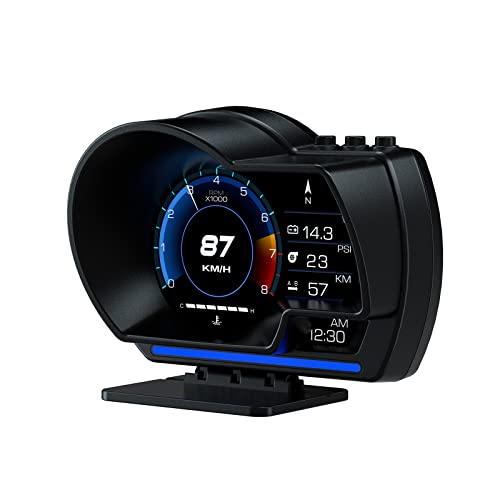
- Combines OBD2 and GPS modes
- Shows speed and multiple vehicle metrics
- Includes dashboard and windshield mounting
Best For: Compatible OBD2 vehicles needing speed and expanded data
Best Adjustable GPS Model

- Switches between MPH and KM/H
- Offers speed calibration and overspeed alerts
- USB powered with adjustable brightness
Best For: Drivers wanting customizable speed display settings
Best Large-Screen Multifunction Pick

- 5.5-inch borderless display
- More than ten configurable interfaces
- Shows speed, mileage, direction, and trip data
Best For: Drivers wanting a large, information-rich GPS display
Best for Everyday Use

- Shows speed, RPM, temperature, voltage, and more
- Scans and clears engine fault codes
- Supports adjustable alarms and display settings
Best For: Compatible post-2008 vehicles needing diagnostics and driving data
Best Windshield Projection

- Projects speed onto the windshield
- Displays RPM, temperature, voltage, and trip data
- Automatic brightness and four alarm functions
Best For: Compatible post-2008 gasoline cars needing projected OBD2 data
OBD2 Data Choice

- Displays speed plus RPM, voltage, and water temperature
- Eight switchable display interfaces
- Dashboard or A-pillar installation
Best For: Compatible 2008-and-newer cars needing expanded vehicle data
Readable GPS Pick

- USB plug-and-play installation
- Large MPH/KM/H speed display
- Brightness control and overspeed alert
Best For: Drivers wanting a simple, readable GPS speedometer
Windshield Visibility Pick

- No OBD port required
- Automatic brightness adjustment
- Large-font GPS speed display
Best For: USB-equipped vehicles needing a compact GPS speed readout
Best USB GPS Pick – Large-Display Car HUD
For drivers comparing car head up displays for older cars, this USB-powered GPS unit is a straightforward option when you want a large speed readout without using an OBD port. Its 10Hz GPS/BDS positioning, automatic brightness adjustment, and MPH-focused display prioritize simple at-a-glance viewing.
Best For: Older drivers and vehicles with a USB port that need a simple, readable GPS speed display.
Pros:
- USB plug-and-play power requires no OBD port.
- Large font and anti-reflective shading are designed for easy viewing.
- Automatic brightness adjustment supports daytime and nighttime driving.
- 10Hz GPS/BDS positioning connects with up to 32 satellites.
Cons:
- GPS speed can vary by about 0.6–1.8 MPH.
- Satellite reception may be affected in tunnels, garages, poor weather, or behind metallic windshield film.
- It displays speed in MPH by default and is specified up to 115 MPH.
This is a practical choice for older cars lacking a convenient OBD setup. It is especially appealing if readability and easy USB installation matter more than displaying extensive vehicle data.
Best Data-Rich Option – OBD2/GPS P6 HUD
This wiiyii P6 is a more feature-oriented choice among car head up displays for older cars. It combines OBD2 and GPS modes, can show speed and other vehicle data, and offers dashboard or windshield installation with an adjustable bracket.
Best For: Drivers with a compatible OBD2 vehicle who want speed plus additional vehicle information.
Pros:
- Dual OBD2 and GPS modes provide flexibility.
- Can display speed, voltage, fuel consumption, RPM, and water temperature.
- Offers more than 100 possible OBD data readings according to the supplied notes.
- Includes dashboard and windshield mounting options.
Cons:
- OBD data features depend on vehicle compatibility.
- Vehicles without the supported OBD2 protocol use GPS-only functionality.
- Its larger, heavier design may be less discreet than compact HUDs.
The P6 makes sense when an older car has a compatible diagnostic port and you want more than a basic speed projection. Confirm OBD2 compatibility before buying if the extra vehicle data is important.
Best Adjustable GPS Model – Speed-Alert Car HUD
For shoppers seeking car head up displays for older cars with configurable viewing options, this USB GPS model adds MPH/KM/H switching, speed calibration, adjustable brightness, and an overspeed alert. Its large display is designed to keep speed visible without looking down.
Best For: Drivers who want a readable GPS display with speed-unit choice and customizable overspeed warnings.
Pros:
- USB plug-and-play installation suits vehicles with a USB power source.
- Switches between MPH and KM/H.
- Manual speed calibration can help match the vehicle dashboard.
- Adjustable brightness and a custom overspeed alert add flexibility.
Cons:
- GPS performance can be affected by tunnels, underground garages, weather, or metallic windshield film.
- It requires a USB power source.
- The listed display is specified in MPH by default and up to 115 MPH.
This model is a good fit when basic speed projection is not enough and you want calibration, unit switching, and an alert feature. It remains a GPS-based device, so signal conditions still matter.
Best Large-Screen Multifunction Pick – Liiiyuan G12 HUD
The Liiiyuan G12 stands out among car head up displays for older cars with its 5.5-inch borderless screen and broad selection of readouts. It uses GPS and Beidou positioning, connects through USB, and includes a rotating bracket for flexible placement.
Best For: Drivers who want a large, configurable screen showing speed alongside trip and driving information.
Pros:
- 5.5-inch borderless display is designed for a clear line of sight.
- Offers more than ten display combinations.
- Shows speed, time, mileage, driving direction, coordinates, and other information.
- USB plug-and-play setup includes a 360-degree rotating bracket.
Cons:
- The larger screen may take up more dashboard space than compact units.
- Its many display options may require setup to find the preferred view.
- GPS-based functions depend on satellite reception.
The G12 is the strongest choice here for drivers who value screen size and information variety. Its flexible mounting and one-year warranty service add practicality, provided there is enough dashboard or console space.
Best Simple Setup – GPS Speed HUD
For drivers comparing car head up displays for older cars, this GPS-based unit offers a straightforward alternative to adding or modifying factory instrumentation. It plugs into a USB power source, displays speed in MPH or KM/H, and uses a large, anti-reflective readout designed for quick viewing.
Best For: Older vehicles needing a simple, portable speed display without an OBD2 connection.
Pros:
- USB plug-and-play installation
- GPS and BDS positioning with a 10Hz refresh rate
- Switchable MPH/KM/H display and manual speed calibration
- Adjustable brightness and customizable overspeed alert
Cons:
- GPS performance may be affected in tunnels, garages, heavy rain, fog, or behind metallic windshield film
- Displays speed-focused information rather than broader vehicle diagnostics
This is the most approachable option when installation simplicity matters more than engine data. Its large font, shading, and brightness controls may also suit older drivers, though GPS limitations should be considered for frequent tunnel or garage driving.
Best for Everyday Use – OBD2 and GPS Car HUD
Among car head up displays for older cars, this model stands out for combining GPS speed tracking with OBD2 vehicle data. Depending on the connection and vehicle, it can show speed, RPM, water temperature, voltage, fuel consumption, trip information, and other driving metrics, while also offering fault-code scanning.
Best For: Drivers with a compatible gasoline vehicle made after 2008 who want both speed display and diagnostic information.
Pros:
- OBD2 and GPS modes in one device
- Displays numerous driving and engine metrics
- Can scan and clear engine fault codes
- Adjustable brightness, units, interfaces, and safety alarms
Cons:
- OBD2 compatibility is limited to supported vehicles produced after 2008
- Listed incompatibilities include diesel, hybrid, pickup, RV, and several brands and modified vehicles
- May provide only GPS functions when the vehicle’s OBD2 protocol is incompatible
This is the most capable choice for compatible vehicles, but buyers should verify make, fuel type, model year, and OBD2 support before ordering. Its GPS fallback adds flexibility, although it may not deliver the full diagnostic feature set in every car.
Best Windshield Projection – MAIMEIMI OBD2 HUD
For shoppers seeking car head up displays for older cars, the MAIMEIMI projects key information onto the windshield rather than requiring a separate glance at a dashboard screen. It uses an OBD2/EOBD connection to show speed and additional data such as RPM, water temperature, voltage, and trip information.
Best For: Drivers with a compatible gasoline OBD2/EOBD car made after 2008 who prefer windshield-projected information.
Pros:
- Projects speed data directly onto the windshield
- Provides multiple vehicle data modes beyond speed
- Includes overspeed, fatigue-driving, speed, and engine-failure alarms
- Automatic brightness adjustment with manual control available
Cons:
- Not compatible with OBDI, JOBD, hybrid, diesel, pickup, or RV vehicles
- The notes list numerous brand and model exceptions that require checking before purchase
- Requires a compatible OBD2/EOBD connection
The windshield projection and automatic brightness sensor make this a practical, visibility-focused option. Its usefulness depends heavily on vehicle compatibility, so confirm the exact model and protocol before relying on its OBD2 data features.
OBD2 Data Choice – wiiyii P8 Car HUD
For drivers comparing car head up displays for older cars, the wiiyii P8 is a practical option when the vehicle supports OBD2. It can show speed and other vehicle data, while its two installation options let you place it on the dashboard or A-pillar trim.
Best For: Drivers with compatible 2008-and-newer cars who want speed plus expanded vehicle information.
Pros:
- OBD2 and GPS dual-system operation provides speed, RPM, voltage, water temperature, and clock data.
- Offers eight switchable display interfaces.
- Installs through USB power, with dashboard and A-pillar placement options.
- Includes multiple alarm functions and a one-year manufacturer warranty.
Cons:
- OBD2 mode is the default, so compatibility matters for older vehicles.
- GPS speed display may take about half a mile to acquire satellite information.
- The 1.8-inch screen is smaller than some dedicated GPS displays.
The P8 stands out when you want more than a simple speed readout. Confirm your vehicle’s OBD2 compatibility before buying, especially if you are choosing among car head up displays for older cars.
Readable GPS Pick – K4 Car HUD
The K4 is a straightforward choice among car head up displays for older cars because it uses USB power rather than an OBD connection. Its large speed readout, adjustable brightness, and GPS-based operation are designed for quick viewing without looking down.
Best For: Drivers who want a simple, readable GPS speed display with flexible MPH or KM/H settings.
Pros:
- USB plug-and-play power simplifies installation.
- Dual GPS+BDS positioning supports up to 32 satellite signals with a 10 Hz refresh rate.
- Large, anti-reflective display is designed for readability, including for older drivers and sunglass wearers.
- Includes speed calibration, brightness adjustment, and an overspeed alert.
Cons:
- GPS performance can be affected in tunnels, underground garages, heavy rain or fog, and behind metallic windshield film.
- It relies on GPS data rather than displaying the vehicle’s OBD information.
- Speed calibration may be needed to match the vehicle dashboard.
Choose the K4 when easy USB installation and a prominent speed display matter more than engine-data monitoring. Its GPS design also avoids the need to verify OBD compatibility.
Windshield Visibility Pick – K1 Car HUD
For shoppers seeking car head up displays for older cars without relying on an OBD port, the K1 offers USB-powered GPS speed tracking. It is designed to place speed in the driver’s line of sight, with automatic brightness adjustment for changing light conditions.
Best For: Drivers seeking a compact, windshield-oriented speed display for cars, trucks, or motorcycles with USB power.
Pros:
- Works through a 5V USB connection and does not require an OBD port.
- GPS+BDS positioning, up to 32 satellites, and a 10 Hz refresh rate support responsive speed tracking.
- Large-font display and anti-reflective metal shading help readability.
- Automatic brightness adjusts for daytime and nighttime viewing.
Cons:
- GPS speed may vary by about 0.6–1.8 MPH.
- Satellite reception can be interrupted in tunnels, underground garages, poor weather, or behind metallic windshield film.
- It provides GPS speed rather than the broader vehicle data available from an OBD display.
The K1 is a sensible fit for older vehicles when you want a simple installation and do not want to depend on OBD compatibility. Allow for normal GPS variation and use it where satellite reception is clear.
How We Picked the Best Car Head Up Displays for Older Cars
We focused on features that matter when modernizing an older vehicle: power and connection requirements, display readability, available driving data, installation simplicity, and compatibility. The selection includes GPS-based units that can work independently of a vehicle’s diagnostic port, OBD2 models that read information from the car’s computer, and dual-system designs that offer more flexibility.
We also considered whether a display is better suited to basic speed monitoring or broader gauge functions such as engine speed, coolant temperature, voltage, mileage, and overspeed alerts. Because product specifications and vehicle compatibility can vary, confirm the listing details and your car’s port type before purchasing.
Quick Comparison
- GPS speedometer HUDs: Usually the simplest option for older cars and can provide speed without accessing engine data.
- OBD2 HUDs: Best for drivers who want vehicle information, but they require a compatible OBD2 or EUOBD port.
- Dual-system HUDs: Offer GPS and OBD2 functionality for broader compatibility and more data.
- Basic displays: Better for drivers who want a less distracting speed readout.
- Multifunction displays: Useful for monitoring several gauges, though they may take longer to configure.
Key Buying Factors for Car Head-Up Displays for Older Cars
Connection and Compatibility
Check whether the unit uses USB power, GPS, OBD2, or a combination. A GPS model is often the safer choice for very old vehicles or cars without a functioning diagnostic interface. For OBD2 units, verify that your vehicle has a compatible port and supports the data the display claims to show.
Information Shown
Decide whether you only need digital speed or also want tachometer readings, water temperature, battery voltage, mileage, fault information, or overspeed warnings. More readings can be helpful, but unnecessary data may make the screen harder to read at a glance.
Visibility and Installation
Look for a bright display with adjustable positioning and a clear reflection on the windshield or included projection surface. The unit should not block your view. Cable routing, mounting space, daytime visibility, and nighttime dimming are also worth checking before installation.
Accuracy and Driving Safety
GPS speed can differ slightly from the vehicle’s speedometer, while OBD2 readings depend on the car’s sensors and electronic systems. Treat the HUD as an aid rather than a replacement for attentive driving, and configure it so essential information remains easy to read without distraction.
Who Should Buy Which Car Head Up Displays for Older Cars?
Choose a GPS HUD if you want the simplest upgrade for an older car, especially when diagnostic compatibility is uncertain. Choose an OBD2 model if your vehicle supports it and you want engine or electrical data in addition to speed. Choose a dual-system unit if you want maximum flexibility across vehicles or prefer having both GPS and diagnostic-based readings available.
For most drivers, a straightforward speed display is the best balance of usefulness and low distraction. Enthusiasts, high-mileage owners, and drivers troubleshooting vehicle behavior may get more value from a multifunction OBD2 model, provided they are comfortable checking compatibility and adjusting the settings.